How to read a RemServ novated lease quote
Checked against 5 quote examples; latest layout reviewed Nov 2026.
RemServ quotes in the examples we reviewed use a short estimate, two styles of summary table and a detailed lease breakdown. Find the layout that looks like yours before choosing a figure. The same “Total Amount Financed” label does not mean the same thing on every layout.
What catches people out on a RemServ quote
- First-year insurance: On a summary, “Not Financed” beside first-year insurance means No. Otherwise choose Not sure until RemServ confirms.
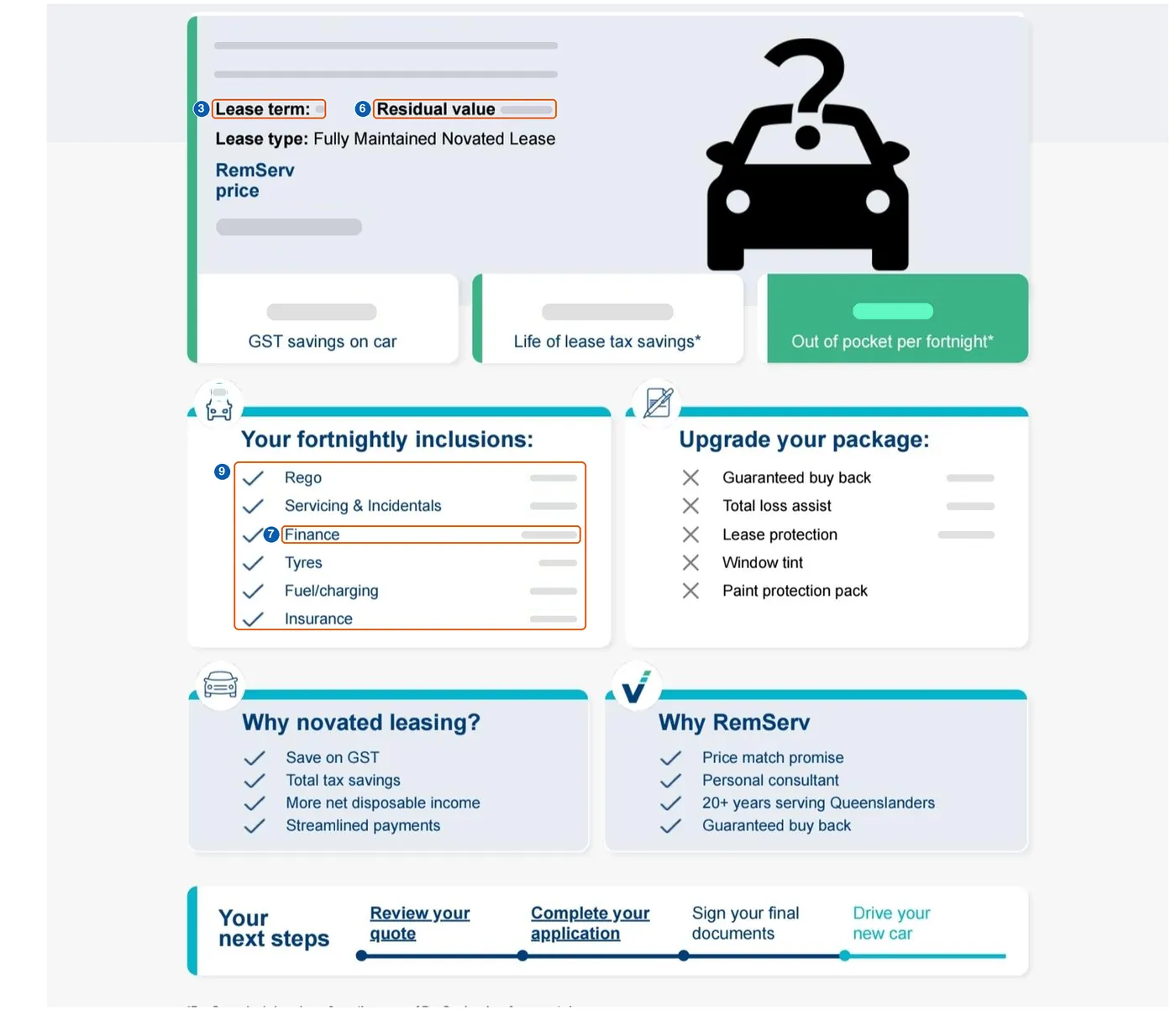
Short estimate. The numbered picture shows only part of RemServ’s quote details.
The short estimate does not establish whether “RemServ price” includes every on-road charge, or whether its “Finance” line includes GST. Get the full quote or ask RemServ before treating either as a confirmed amount.
Summary table
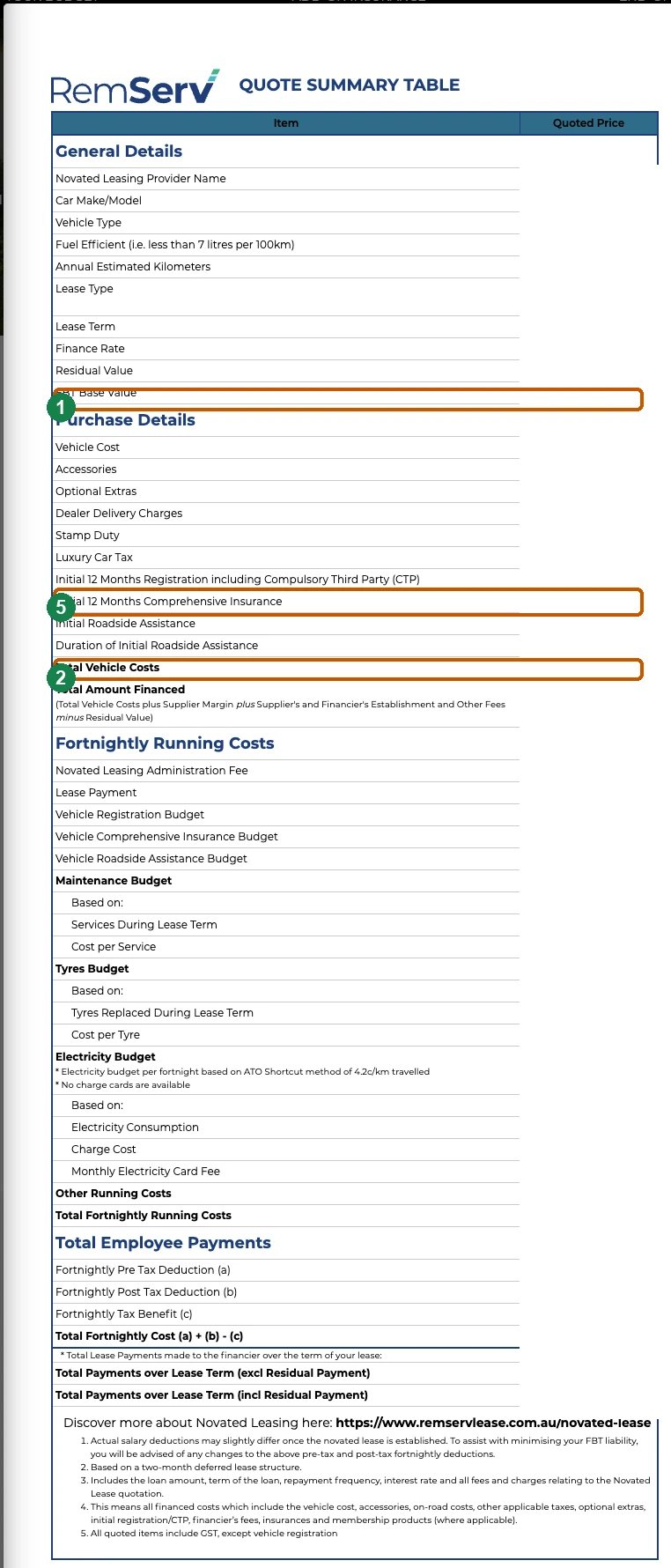
On the summary-table example, “FBT Base Value” is printed under General Details. For the price question, use the bold “Total Vehicle Costs” under Purchase Details and choose that source in Guided. The first-year insurance line nearby shows a premium, but the summary does not clearly establish whether that premium is financed. Choose Not sure on the lease page until RemServ confirms. If confirmed financed, Guided separates the premium from the car price internally so it is counted once.
What the two price choices do: If you enter “Total Vehicle Costs” and later confirm Yes that a first-year premium within it was financed, Guided subtracts that premium from the vehicle price and adds it to financed add-ons. If you enter the detailed “Vehicle purchase price”, Guided leaves the vehicle price alone and adds the confirmed financed premium to add-ons. In either case, the renewal insurance budget stays in the running-cost insurance box. The calculation counts the financed first year through the lease payment rather than a second time in running costs. Answering No or Not sure makes no premium adjustment to the entered price. If the summary total still appears to include a non-financed insurance line, ask RemServ for an itemised on-road price before using it as the vehicle price.
In the newer split summary, “Total Vehicle Costs” is at the top of the screenshot after the Purchase Details rows. Use that bold total in the same way. The posted images skip an intervening line, and the total is higher than the visible rows added together. You can use the printed total without reconstructing it, but ask RemServ for the missing breakdown if you want to check what it contains.

Another RemServ summary example prints the same rows in a larger, split table. Its “Total Amount Financed” explicitly subtracts “Residual Value” from vehicle costs and fees. The earlier summary also prints this definition. This is not the usual upfront loan principal. Its printed formula also lists “Supplier Margin” but not the separately printed “Upfront GST Savings”, so adding the residual back does not reliably recover a conventional financed amount. Do not enter this figure as the drive-away price or as a separate loan amount in Guided: the calculator takes the car price, residual, financed insurance and one-off fees separately.
To check the summary’s own formula, add “Residual Value” as printed to “Total Amount Financed”. The footnote says quoted figures include GST except registration, so do not divide only the residual by 1.1 in that check. This tests the printed formula only; it does not establish the amount the financier advanced or whether first-year insurance was financed. Do not add the premium to the printed “Total Vehicle Costs” yourself. The summary does not explain how its upfront GST saving enters the printed formula.
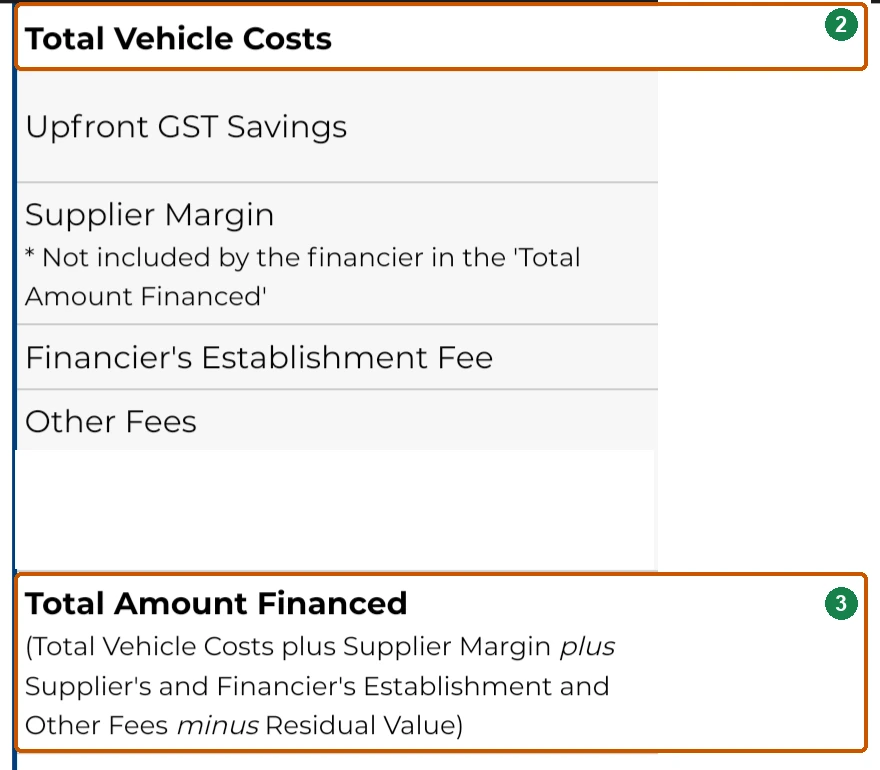
The larger summary also has a “Supplier Margin” line. Its note says the financier excludes that margin from “Total Amount Financed”, while the formula under the total adds it. Those statements conflict. In one quote with a commission disclosure, the supplier margin matches the disclosed finance brokerage over the lease term. That suggests it is recovered through the finance pricing, not charged again as a separate upfront fee. Do not add it to Guided’s documentation fee just because it is listed. If RemServ confirms in writing that your margin is an additional amount financed, enter it once. “Other Fees” may list optional add-on insurance, which belongs with other upfront fees if financed. Use the separate “Lease Payment” per fortnight for Guided’s finance payment.


Another RemServ summary makes the answer explicit: the comment beside “Initial 12 Months Comprehensive Insurance” says “Not Financed”. Choose No for that layout. A premium amount without a financing status is not enough to choose Yes. Ask RemServ whether the first-year premium is part of the lease finance, or choose Not sure until you have confirmation.

The table’s final footnote says quoted items include GST except vehicle registration. Use that footnote to choose the matching GST answer for the residual and “Lease Payment”; the registration budget is entered as printed. The footnote also mentions a two-month deferred structure, but does not show a payment schedule. If you cannot confirm the number of skipped finance payments, choose “Not sure” for months deferred.
Detailed lease breakdown
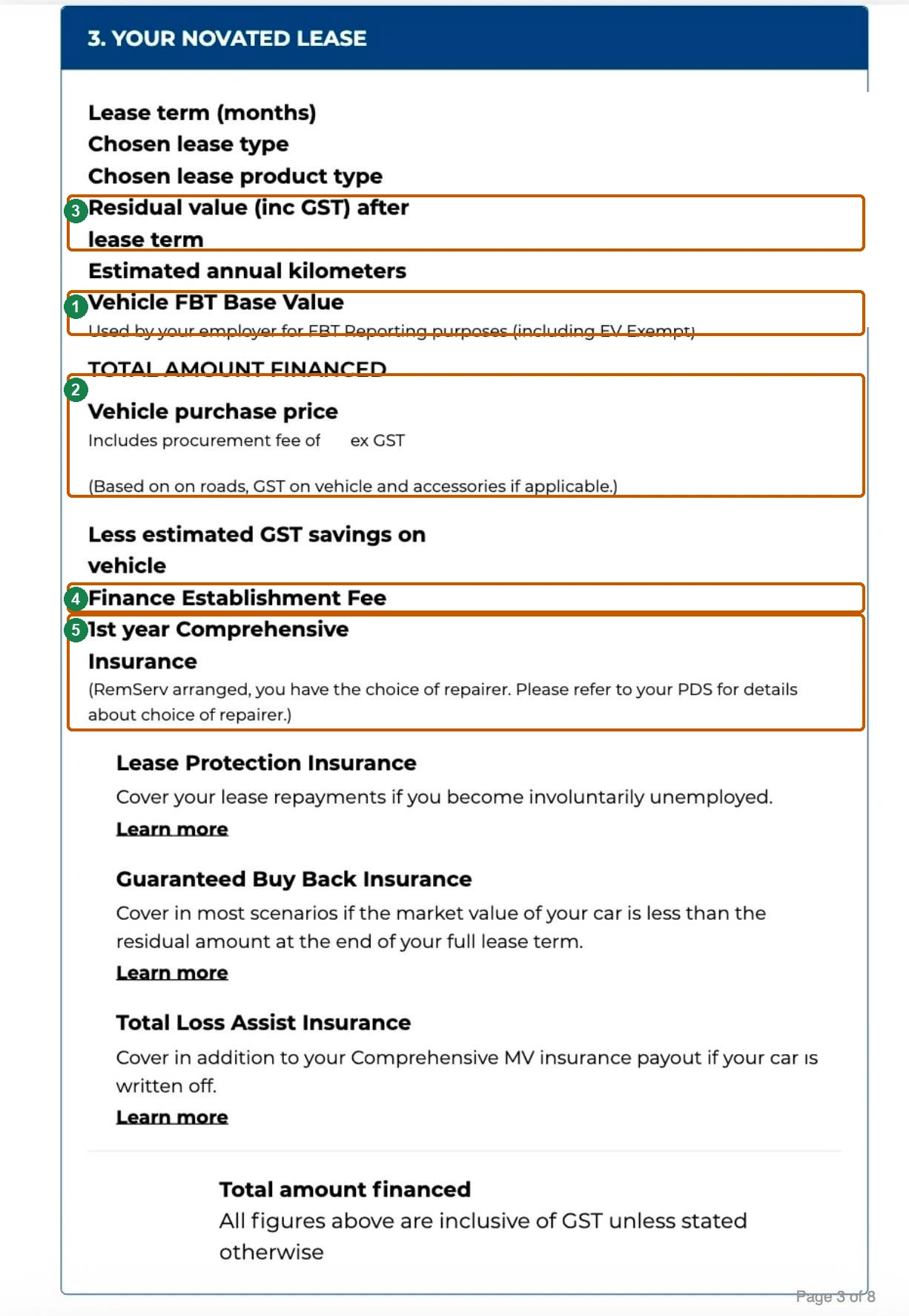
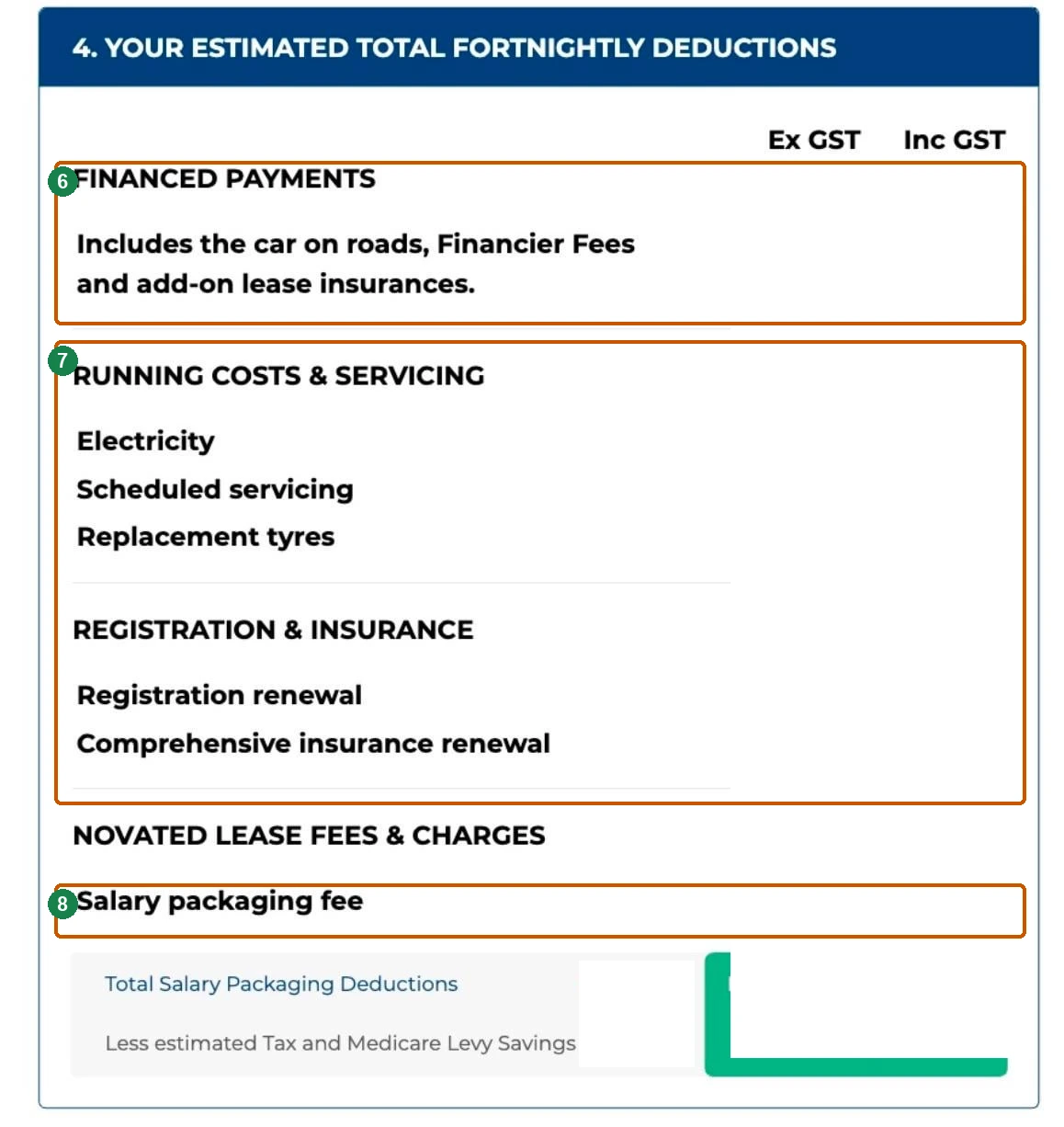
On the detailed example, “Vehicle FBT Base Value”, “Vehicle purchase price”, “Residual value (inc GST)” and “Finance Establishment Fee” are printed separately. Use the on-road “Vehicle purchase price” and choose that source in Guided. “1st year Comprehensive Insurance” is one of the lines in that breakdown, and on the example the lines add up exactly to “Total amount financed”. So on this layout the first-year premium is financed: answer Yes and enter it in Guided’s separate financed first-year box. It sits outside “Vehicle purchase price”, so Guided counts it once. The “Comprehensive insurance renewal” line on the deductions page goes in the running-cost insurance box.
The deductions page shows Ex GST and Inc GST columns. For “FINANCED PAYMENTS” and each running-cost line, use one column and select its matching GST answer. “Salary packaging fee” is the management fee. If optional lease protection, guaranteed buy back or total loss cover is selected and financed, include its upfront premium with the documentation fee. Do not enter “Total amount financed” or “Total Salary Packaging Deductions” as a single calculator field.
- Residual: If the full quote says “Residual value (inc GST)”, choose Including GST. The summary table’s GST footnote also covers residual value.
- Finance payment: Use “FINANCED PAYMENTS” per fortnight on the full deductions page. Choose the “Ex GST” or “Inc GST” column to match what you enter.
All images are based on real quotes with amounts and identifying details removed. Your quote may differ.
Short-estimate numbered field guide
| # | On the quote | In Guided |
|---|---|---|
| 3 | Lease term | Lease term |
| 6 | Residual value (no GST label) | Choose “I’m not sure” unless your full quote or RemServ confirms its GST basis. |
| 7 | Finance (fortnightly inclusion; no GST label) | Enter it per fortnight; choose “I’m not sure” for GST unless confirmed. |
| 9 | Fortnightly inclusions: Rego, Servicing & Incidentals, Tyres, Fuel/charging, Insurance | Running-cost boxes, per fortnight |
On the short estimate, “Upgrade your package” items are optional and not included; leave them out. On the detailed breakdown, check whether those products are selected and financed before entering their cost.
Not shown on the short-estimate sample: 2 drive-away, 8 luxury vehicle adjustment, 11 interest rate. The full layouts show more detail.
If a figure isn’t on your quote
- Months deferred: Can’t find months deferred on your RemServ quote? Choose “Not sure” (we’ll assume 2) unless told otherwise.
This calculator and guide are built and continuously maintained as an independent project.
If it has helped you think more clearly, avoid a costly mistake, or saved you meaningful money, you're welcome to support its ongoing maintenance and improvements:
- Buying me a cuppa ☕ to help cover hosting, development time, and future improvements, or
- Using this Tesla referral link for a $350 discount if you're ordering a Tesla.
I'm backing Dr Michael Keane's fight for salary packaging transparency
Workplaces with an exclusive salary packaging provider tend to have noticeably higher effective interest rates on novated leases — yet the commercial terms behind these exclusive arrangements are rarely disclosed to employees.
Dr Michael Keane, a Melbourne anaesthetist, is taking a Victorian health service to the Victorian Supreme Court to obtain the unredacted contract between the hospital and its exclusive salary packaging provider. The unredacted version may shed light on alleged sign-on fees associated with exclusive access to hospital employees — an arrangement whose financial terms employees are rarely privy to.
To date, Dr Keane has personally spent around $15,700 pursuing this case, with further legal costs anticipated. I believe this matters to anyone in a workplace with an exclusive provider. If you agree, consider supporting his  GoFundMe.